Inspect IPA Files for Security Issues (Without Reverse Engineering)

An IPA file is the packaged, distributable format of an iOS application. It contains everything required to run your app on a device compiled binaries, configuration files, entitlements, and embedded resources. From a security perspective, that makes the IPA file the single most important artifact to review before an app reaches users or the App Store.
For teams serious about iOS app security, inspecting the IPA is not optional. This is where real-world security issues surface, often long after source-code reviews and static linters have already signed off. Build-time decisions, compiler behavior, and configuration drift frequently introduce risk that never existed in the repository.
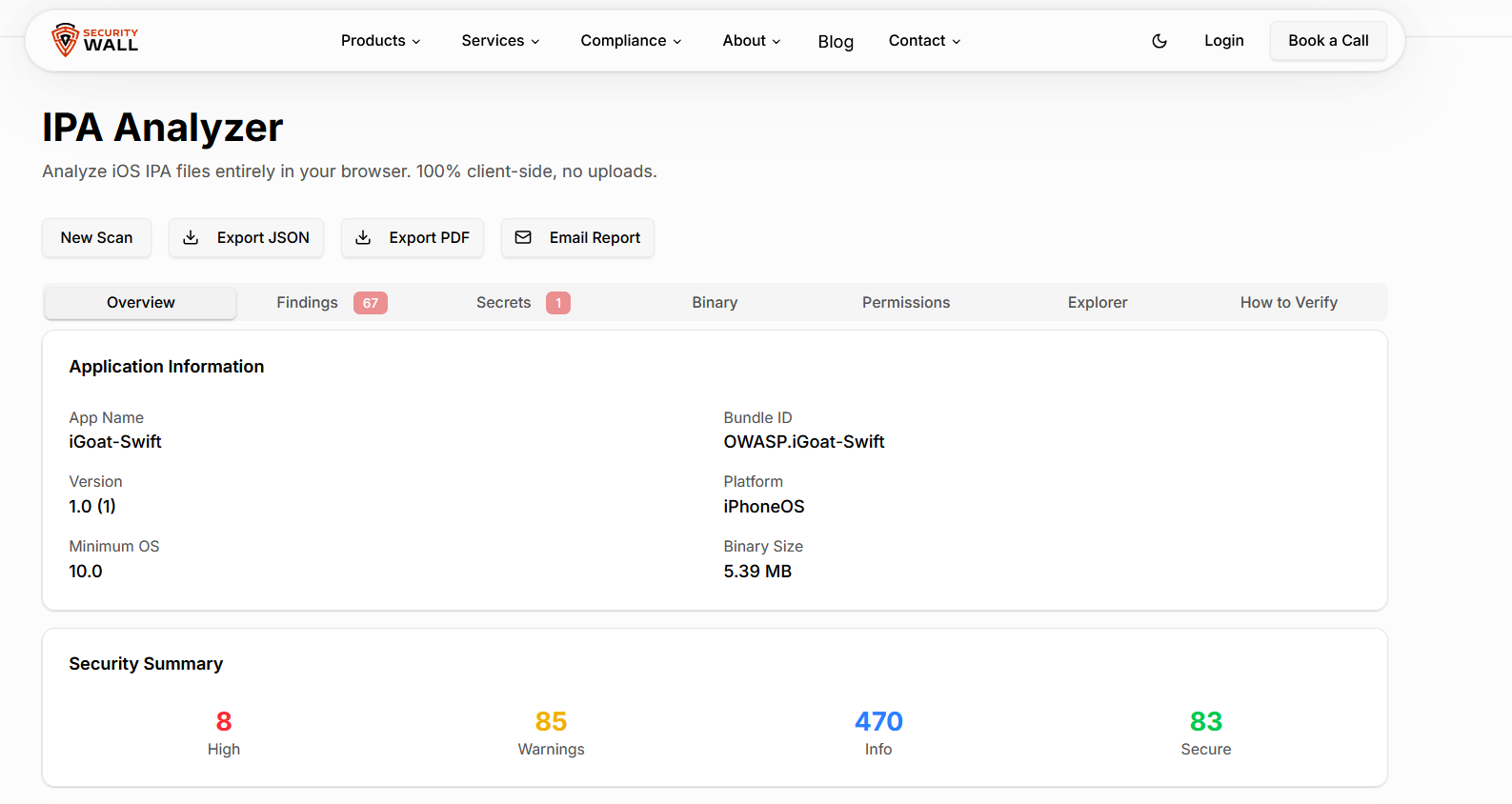
Skipping IPA-level inspection introduces tangible risks, including:
- Hardcoded secrets such as API keys or tokens embedded during build time
- Insecure entitlements that over-expose device capabilities
- Weak or misconfigured encryption that undermines data protection
Despite these risks, many teams still believe a persistent myth:
“You need reverse engineering to inspect IPA files.”
That misconception has led developers to either avoid IPA security analysis altogether or rely on complex workflows that slow delivery. In reality, modern IPA security analysis can be performed quickly and safely without reverse engineering and without specialized tooling.
2. The Traditional Way: Reverse Engineering IPA Files (And Its Problems)
2.1 What Most Guides Recommend
If you search for how to inspect IPA files, most tutorials and blog posts recommend a familiar path:
- Command-line tools such as
otool,strings, orclass-dump - Manual extraction and review of
Info.plist - Low-level binary inspection
- Jailbroken devices or simulator-only workflows
These guides are often detailed and technically impressive, but they assume a level of security expertise and available time that most development teams simply don’t have.
2.2 Why This Approach Doesn’t Scale
While reverse engineering can be valuable for deep research, it fails as a repeatable security practice:
- It requires specialized security skills
- It is time-consuming and manual
- It increases the risk of missed vulnerabilities
- It does not fit modern CI/CD pipelines
- It creates friction for developers and QA teams
This is why many organizations read long walkthroughs, experiment once, and then abandon IPA inspection entirely. The effort outweighs the perceived benefit.
3. What You Actually Need to Inspect in an IPA File
Effective IPA inspection is not about disassembling your app it’s about reviewing specific security-critical artifacts. A focused, static approach delivers far more value.
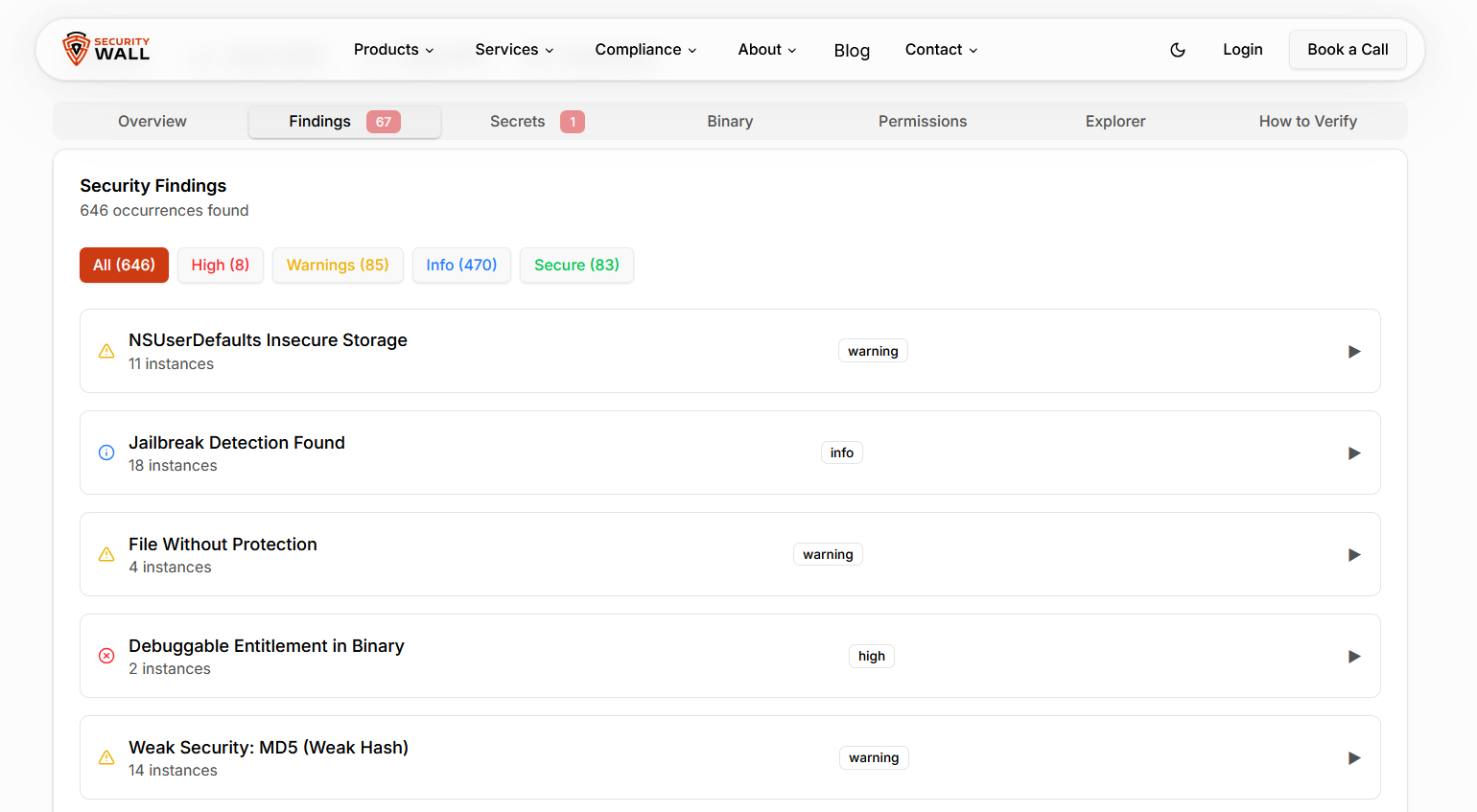
3.1 Application Metadata
Configuration issues are one of the most common causes of iOS security weaknesses:
Info.plistvalues- Privacy usage descriptions
- URL schemes and deep-link configurations
These settings directly affect how your app interacts with the system and other apps.
3.2 Binary Security Properties
Even without decompiling code, binaries reveal important security signals:
- Position Independent Executable (PIE) support
- Stack canaries
- Automatic Reference Counting (ARC) usage
- Encryption and protection flags
These indicators help assess the app’s resistance to memory-based attacks.
3.3 Sensitive Data Exposure
Static inspection frequently uncovers sensitive data that was never meant to ship:
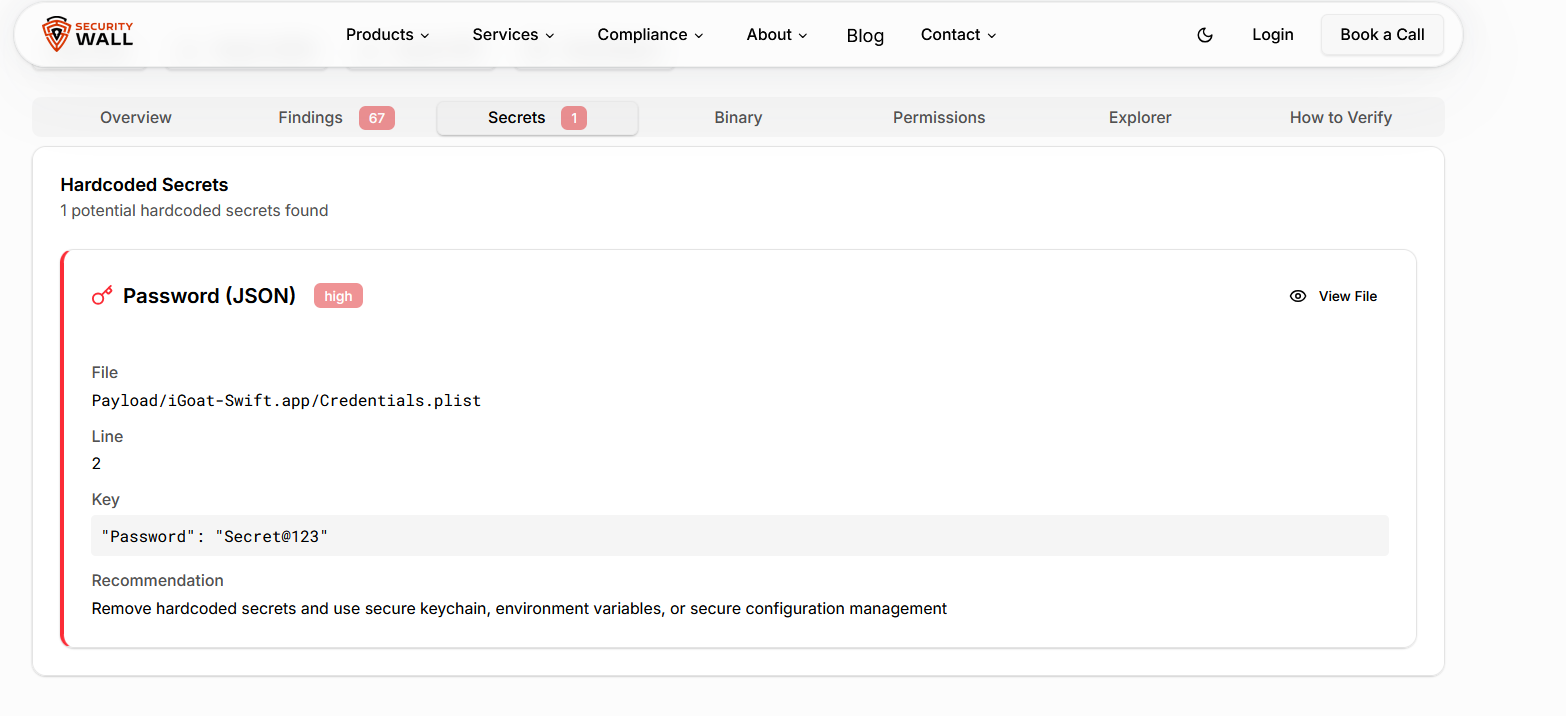
- Hardcoded secrets
- API keys and access tokens
- Debug flags or test credentials
Once embedded in an IPA, these artifacts are trivial for attackers to extract.
3.4 Network & Transport Security
Network misconfigurations remain a leading cause of mobile breaches:
- App Transport Security (ATS) settings
- Insecure or unencrypted endpoints
- Missing or weak certificate pinning
Together, these checks form the foundation of iOS static analysis, IPA vulnerability assessment, and modern iOS app security testing.
4. Why Reverse Engineering Is No Longer Necessary
Here’s the key shift in mindset: static analysis is not reverse engineering.
Modern IPA inspection relies on:
- Pattern-based and context-aware analysis
- Metadata and binary introspection
- Security rule evaluation aligned with standards
This approach avoids decompilation entirely. It is faster, safer, repeatable, and most importantly usable by real development teams. Once you understand this distinction, inspecting IPA files becomes a practical security step rather than a research exercise.
5. How to Inspect IPA Files Without Reverse Engineering
5.1 Introducing a Browser-Based IPA Analyzer
The simplest way to perform IPA security analysis today is with a browser-based analyzer. This approach eliminates the traditional barriers:
- No local setup
- No jailbroken devices
- No command-line tools
- No unnecessary exposure of sensitive code
A modern solution like the SecurityWall Powered IPA Analyzer provides immediate visibility into security-relevant issues directly from the IPA file.
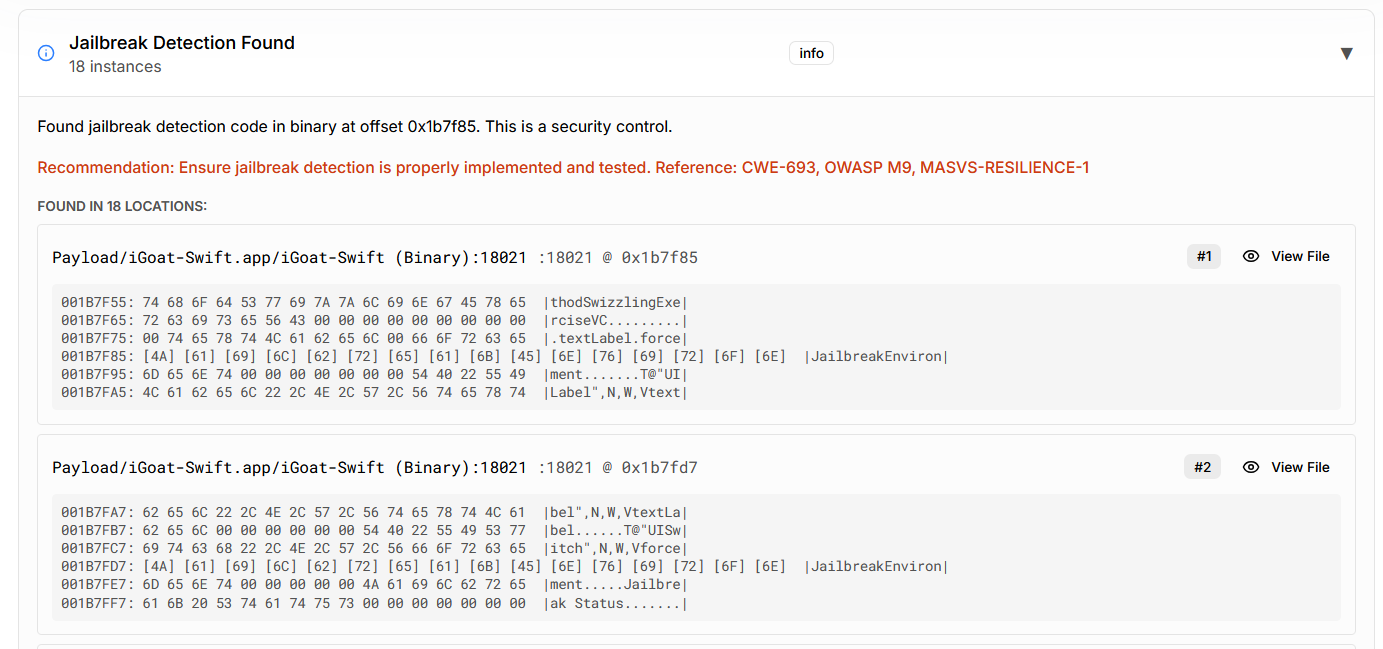
5.2 Step-by-Step: Inspecting an IPA in Minutes
The workflow is intentionally straightforward:
- Select or upload the IPA file
- Allow automated extraction and static analysis
- Review findings across:
- Configuration issues
- Binary protection status
- Sensitive data patterns
- Address risks before release or submission
This approach turns IPA inspection into a routine quality gate rather than a one off security exercise.
6. How This Fits Into an iOS Security Workflow
For mature teams, IPA inspection complements not replaces broader security initiatives:
- Pre-App Store submission checks
- Secure code review support
- CI/CD pipeline validation
- Alignment with OWASP MASVS for iOS
- Pairing with dynamic testing and professional mobile application penetration testing
Many organizations integrate static IPA analysis alongside broader security services and formal penetration testing to achieve defense-in-depth.
7. Common Security Issues Found Through IPA Inspection
Automated IPA inspection consistently reveals issues such as:
- Debug builds shipped to production
- Disabled or weakened ATS enforcement
- Weak cryptographic implementations
- Over-permissive entitlements
- Embedded secrets or credentials
These problems are notoriously easy to miss in source code reviews and remarkably easy to detect once you analyze the IPA itself.
Strengthening Your iOS Security Coverage
To build a complete and effective iOS security strategy, IPA inspection should be combined with standards-based guidance and practical validation tools.
- OWASP MASVS guidance
Align your IPA inspection efforts with industry-recognized mobile security standards. OWASP MASVS provides a structured framework for validating iOS app security requirements across architecture, storage, cryptography, and network communication. - IPA Analyzer
Use the IPA Analyzer to apply static security analysis directly to your iOS app package. It helps uncover configuration weaknesses, binary protection gaps, and embedded secrets without reverse engineering or complex setup.
Together, these resources help transform iOS security from a theoretical concern into a repeatable, developer-friendly process that fits modern release cycles.
8. Who Should Be Inspecting IPA Files?
IPA security analysis is relevant far beyond security teams:
- iOS developers validating production builds
- Security engineers and AppSec teams
- QA teams performing release checks
- Startups preparing for App Store review
- Organizations pursuing structured compliance such as ISO 27001 compliance
Even teams using advanced security platforms like SLASH benefit from lightweight, build level inspection.
Faster, Safer iOS Security Starts with IPA Analysis
Reverse engineering is no longer a prerequisite for inspecting IPA files. What matters today is speed, clarity, and consistency.
By shifting IPA inspection from a specialist activity to an automated, developer friendly process, teams catch real issues earlier before attackers, auditors, or App Store reviewers do.
Inspecting the IPA before it ships is one of the simplest and most effective steps you can take to meaningfully improve your iOS security posture.